

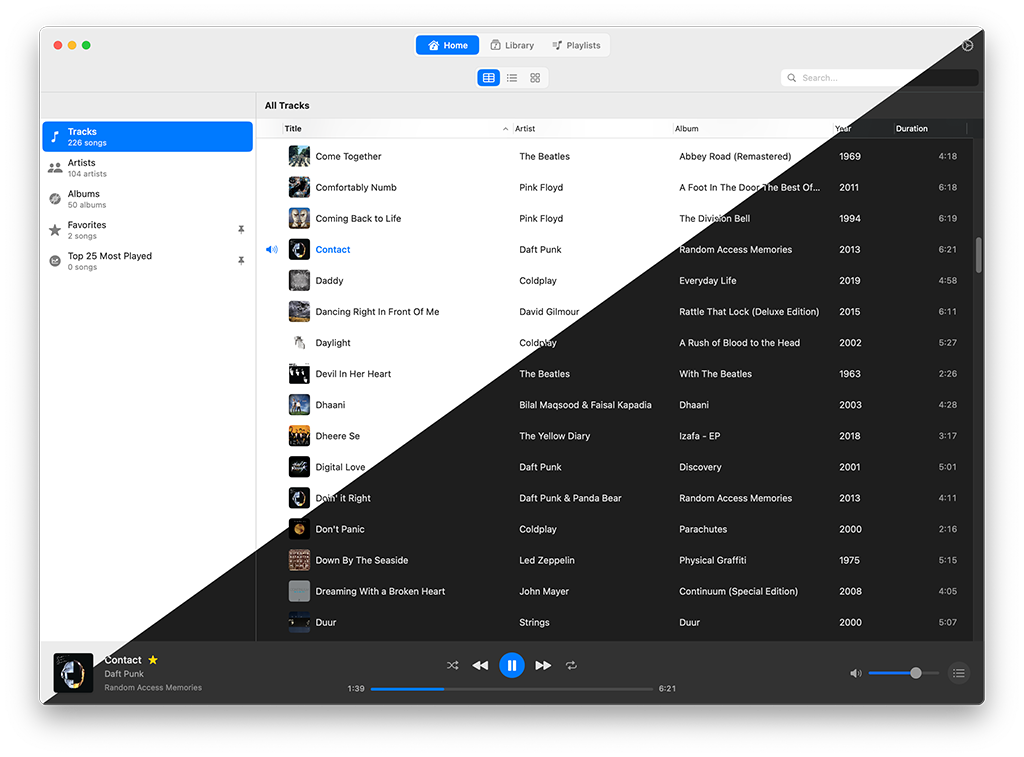
In an age dominated by the endless scroll of streaming playlists and monthly subscriptions, there’s a quiet revolution brewing for Mac users who cherish their personal music collections. Enter Petrichor, a brand-new, open-source music player that’s poised to become the beloved sanctuary for your cherished MP3s, FLACs, and other audio gems. Launched just this week (around July 9, 2025), this lightweight yet powerful application, crafted by developer Kushal Pandya, offers a sleek, modern, and gloriously offline way to rediscover and enjoy your digital music treasures. Built with Apple’s native SwiftUI framework and powered by the efficient GRDB and robust AVFoundation, Petrichor is a breath of fresh air for anyone craving a simple, internet-free, and beautiful music experience.
A Love Letter to Your Curated Collection
Remember the almost ritualistic joy of meticulously organizing your music folders, carefully tagging each MP3, and painstakingly crafting the perfect playlist? Petrichor harks back to that sense of ownership and personal curation, but with all the modern polish you’d expect from a native macOS app. Unlike the streaming giants that constantly nudge you towards subscriptions or bombard you with ads, Petrichor is purely about your music – those gigabytes of MP3s, FLACs, WAVs, AACs, AIFFs, and M4As you’ve diligently collected over the years. It’s designed specifically for Mac users who desire complete control over their music playback without needing an active internet connection or relying on a remote cloud service.
What truly sets Petrichor apart is its intelligent and gentle approach to organizing your library. Instead of forcing you into a rigid structure, it intelligently scans your existing music folders. It then builds a lightweight SQLite database using GRDB (a fast, Swift-based library), which simply reads metadata without ever touching or altering your original files. This “zero-intrusive” method is a huge win, ensuring your carefully organized folder structures remain perfectly intact while Petrichor provides a clean, elegant, album-focused view, or lets you stick to Browse by your familiar folder hierarchy. As one user on X (formerly Twitter) affectionately put it, “Petrichor feels like a love letter to my old iTunes library, but way prettier and without the bloat.”
Built for Mac, Built for Seamless Performance
Petrichor’s seamless integration with macOS is no accident. Its technical foundation is a carefully chosen trio:
- SwiftUI: Apple’s declarative UI framework ensures the app feels incredibly “at home” on macOS, offering a buttery-smooth, native user interface. This means perfect dark mode support, intuitive menubar controls, and dock playback integration that make it feel as natural as any first-party Apple application.
- GRDB: This lightweight, Swift-based library handles the app’s database management. By leveraging SQLite, Petrichor efficiently indexes your music collection, ensuring that searches remain lightning-fast even for libraries containing tens of thousands of tracks. If a song’s metadata is missing, it intelligently falls back to an in-memory search, guaranteeing you can always find your tunes.
- AVFoundation: Apple’s robust media framework provides the backbone for high-quality audio playback. It delivers flawless playback for a wide range of audio formats, including uncompressed WAV and lossless FLAC files for the discerning audiophile, alongside standard compressed formats like MP3 and AAC for casual listeners.
The app’s database-driven approach, powered by SQLite’s FTS5 search engine, is a standout. This means that unlike older players that might rescan your files every time you open them, Petrichor offers virtually instant search results. The developer notes that while Petrichor is smart enough to work around missing metadata, features like album and artist views truly shine when your files have accurate tags. So, if your library is a bit messy, a quick tidying session with a dedicated tag editor beforehand will enhance your Petrichor experience.
Features That Hit All the Right Notes
Petrichor isn’t just about technical prowess; it’s designed to be genuinely delightful to use. Here’s a closer look at its user-friendly features:
- Flexible Library Views: Browse your music by neatly organized album, artist, or year, or if you prefer, stick to your existing folder structure for a more hands-on approach. You can easily right-click a track to instantly jump to its associated album or artist, making navigation incredibly fluid.
- Playlists and Pinning: Effortlessly create custom playlists to fit any mood or occasion. For your absolute favorites, you can “pin” albums, artists, or specific folders directly to the sidebar for instant access, keeping your most loved music always within reach.
- Intelligent Search: Find any song in your collection, no matter how vast, instantly thanks to the powerful SQLite FTS5 search capabilities.
- Native macOS Integration: Enjoy a visually clean and intuitive interface that fully supports dark mode, provides convenient menubar playback controls, and integrates smoothly with your macOS dock—it truly feels like a natural part of your Mac.
- Interactive Play Queue: Easily manage what’s coming up next. Drag and drop songs within the “Now Playing” view to rearrange your queue, ensuring your listening experience flows exactly as you desire.
While Petrichor is currently in its alpha stage of development, it’s already garnering significant praise for its simplicity and clear focus. As one Reddit user shared, “I’ve tried countless Mac music apps over the years, but Petrichor’s folder Browse and clean UI are exactly what I needed for my 20GB music collection.”
Early Challenges and Community-Driven Growth
Being an alpha release, Petrichor is, understandably, not without its initial quirks. Some early users have reported slow initial scans for particularly large libraries, with one user noting it took an hour to index 300 songs, only for the settings to then display “0 tracks” due to a glitch. Developer Kushal Pandya has been commendably responsive, actively encouraging users to file detailed issues on the project’s GitHub page, complete with log files, to help iron out these bugs efficiently before the much-anticipated v1 release. Another common request from the community is for better integration with external tag editors like Yate, which could streamline the process of fixing messy metadata – a crucial factor for features like Petrichor’s album and artist views to perform optimally. Despite these growing pains, the app’s open-source nature and active developer-community interaction promise a bright future for the project.
How to Get Started with Petrichor
Ready to breathe new life into your cherished offline music collection? Here’s a quick, step-by-step guide to installing and beginning your journey with Petrichor on your Mac:
- Install Petrichor:
- Using Homebrew (Recommended): Open your Terminal application and first add the developer’s Homebrew tap:
brew tap kushalpandya/tap - Then, install the app with a single command:
brew install --cask petrichor - Manual Installation: Alternatively, you can download the latest
.dmgfile directly from the Releases page on the Petrichor GitHub repository. Open the.dmgand drag the Petrichor app icon into your Applications folder. - Launch Petrichor from your Applications folder or via Spotlight. You may need to right-click the app icon and select “Open” the first time, then click “Open” again, to bypass macOS Gatekeeper warnings for new applications.
- Using Homebrew (Recommended): Open your Terminal application and first add the developer’s Homebrew tap:
- Add Your Music Library:
- Once Petrichor is open, navigate to Settings > Library.
- Click the “Add Folder” button.
- Browse to and select the main folders where your music is stored (e.g., your
~/Musicfolder, or external drives containing your music). - Petrichor will then begin scanning and indexing your music files. This process can take anywhere from a few minutes to an hour or more for very large collections, depending on the number of files and your Mac’s speed.
- Important Tip: For the best experience with Petrichor’s album and artist views, ensure your music files have accurate and consistent metadata (tags). If the scan encounters issues or appears stuck, check the Petrichor GitHub Issues page for known problems or consider filing a new bug report with your app’s log file for the developer to investigate.
- Explore Your Newly Organized Library:
- Use the left-hand sidebar within the app to effortlessly browse your music by albums, artists, or stick to the traditional folder view if that’s your preference.
- To quickly access your most-loved content, right-click on any album, artist, or folder and select “Pin to Sidebar.”
- Use the prominent search bar at the top of the window to instantly find songs. You can search by artist names, song titles, album names, or even genres if your metadata is comprehensive.
- To create a custom playlist, click the “+” icon in the Playlists section of the sidebar, give it a name, and then simply drag and drop tracks from your library into it.
- Customize Playback and Control:
- Control your music playback conveniently using the native menubar controls (located at the top of your screen) or directly from the macOS dock.
- Manage what’s playing next by interacting with the “Now Playing” view, where you can easily drag and drop songs to rearrange your queue.
- Right-click on any track in the main view or play queue to jump directly to its full album or artist page for quick navigation.
- Contribute or Report Issues:
- Since Petrichor is an open-source project, your feedback and contributions are highly valued! Visit the GitHub repository (github.com/kushalpandya/Petrichor) to report any bugs you encounter, suggest exciting new features, or even contribute directly to the code. The developer actively welcomes community involvement to polish the app for its stable v1 release.
Petrichor is freely available under the MIT license, meaning there are no hidden subscriptions, in-app purchases, or pesky ads. For the absolute best user experience, always strive to ensure your local music files have accurate and complete metadata tags, as this significantly enhances features like album art display and proper categorization. If you need a robust tool to clean up messy tags, consider macOS-native applications like Yate or Tag Editor, which integrate well with the Apple ecosystem.
Why Petrichor Matters: A Revival of Local Music
In an era where streaming services have become the default for music consumption, Petrichor stands out as a refreshing testament to the enduring appeal of offline music libraries. Its unwavering focus on local files, combined with its lightweight design and true open-source ethos, makes it a highly attractive option for audiophiles, dedicated music collectors, and anyone simply frustrated by the increasing bloat and subscription fatigue associated with modern streaming apps. Compared to alternatives like the versatile but often clunky VLC (which is a media player, not a dedicated music manager) or feature-rich but paid options like Pine Player, Petrichor’s native macOS integration and intuitive folder-based Browse uniquely fill a crucial gap for users who prioritize simplicity, elegance, and control without sacrificing style.
The app also taps into a quiet but growing demand for robust offline solutions. As streaming subscriptions continue to rise in cost – with Spotify’s Premium plan, for example, reportedly hitting $11.99/month in 2025 – many users are revisiting their local music libraries as a cost-effective and ownership-centric alternative. Petrichor’s ability to handle high-quality FLAC files alongside more compressed MP3s makes it a compelling choice for audiophiles seeking uncompromised sound, while its open-source nature guarantees transparency and fosters community-driven growth and innovation. While it’s still in its alpha phase, meaning occasional bugs are to be expected, keeping an eye on its GitHub repository for updates will ensure you experience its rapid evolution.
A Soundtrack for the Future
Petrichor is more than just another music player; it’s a passion project that celebrates the timeless art of curating your very own music collection. By blending cutting-edge Apple technologies like SwiftUI and GRDB with a nostalgic nod to the golden era of Winamp and early iTunes, it offers a uniquely modern yet deeply satisfying way to enjoy your music. Whether you’re rediscovering forgotten MP3s from your youth or savoring the pristine clarity of lossless FLACs, Petrichor makes every track feel like a personal treasure. As developer Kushal Pandya diligently works towards a stable v1 release, this is one app to watch – and, more importantly, to listen to.